INSTALLATION
Amazon Fire Stick Users
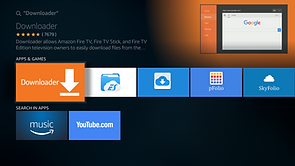
The Global Tivi app can be installed or sideloaded on your Amazon Fire Stick using the Downloader app.
Please make sure you go to Settings, My Fire TV, Developer's Options and turn on Unknown Sources.
If you're using a new Fire Stick, you will still need to go to My Fire TV in settings and click "About" quickly 7 times. It will then give you Developer access. You can then install the app and it will give you options from there on whether you would like to install or not.
To install the Global Tivi App, go to the downloader app on your Amazon Fire Stick and type the Downloader Short Code
4291983
and hit enter. It will then download and click install and then open. After installation, select the option for Playlist TVIP GLOBAL. Then login with your Username and Password and hit enter and it will load the playlist.
.jpg)


iPhone and iOS users
iPhone and iOS users, to use this service, go to the Apple app store and download the VU IPTV app or Smarters Player App.

Then choose the Xtream Codes option and it will prompt you to log in. Enter your Username and Password and you will need to enter a URL.
Please email us for the URL if you need it.